
Developer Guide
How to Use Decisions API: A Practical Guide to Typed AI Decisions
Learn how to use Decisions API to turn text or structured state into typed Choice, Score, and Noul answers that your application can route, review, and act on safely.

title: "How to Use Decisions API: A Practical Guide to Typed AI Decisions"
seoTitle: "How to Use Decisions API: Typed AI Decisions in Practice"
slug: "how-to-use-decisions-api"
description: "Learn how to use Decisions API to turn text or structured state into typed Choice, Score, and Noul answers that your application can route, review, and act on safely."
seoDescription: "A practical guide to using Decisions API: choose a model, prepare state, define typed questions, call the REST endpoint, read probabilities, and add production guardrails."
image: "https://file.decisionapi.net/uploads/how-to-use-decisions-api/cover.png"
imageAlt: "Minimalist hand-drawn sketch of application state flowing through a decision API into structured outcomes"
ogImage: "https://file.decisionapi.net/uploads/how-to-use-decisions-api/cover.png"
ogImageAlt: "A simple technical sketch showing one input becoming typed AI decisions"
canonical: "https://decisionapi.net/blog/how-to-use-decisions-api"
authorName: "DecisionsApi"
category: "Developer Guide"
publishedAt: "2026-10-01"
locale: "en"
keywords: "how to use decisions api, Decisions API tutorial, AI decision API, Choice Score Noul, structured AI decisions, model routing API, classification API"
toc: auto
How to Use Decisions API: A Practical Guide to Typed AI Decisions
Coming soon: OpenAI Decisions API is on the way. This guide uses the current Jev AI format available through DecisionsApi to demonstrate the workflow. The examples explain the decision-API pattern and should not be treated as the final official OpenAI request or response specification.
Coming soon: OpenAI Decisions API is on the way. This guide uses the current Jev AI format available through DecisionsApi to demonstrate the workflow. The examples explain the decision-API pattern and should not be treated as the final official OpenAI request or response specification.
If you are searching for how to use decisions api, the most useful mental model is simple: give a decision model the smallest piece of state it needs, ask one or more bounded questions, and let your application decide what to do with the typed result.
Decisions API is designed for software decisions rather than another chat window. It provides one interface across available decision models, including Jev, Solar Decide, Kev, Mercury Decide, Tev1, and Span variants. You send a model, a state, and a questions map to POST https://decisionapi.net/v1/systemone. The response gives your code structured answers, probability signals, confidence where supported, usage details, and timing information.
This guide walks through the complete path: validating an idea in the Decisions API Playground, choosing the right question type, making a server-side API call, reading the result, and adding the controls that make automation safe. The examples use a support-ticket workflow, but the same pattern works for routing, scoring, evidence checks, moderation, model selection, and agent next steps.
Table of contents
- What Decisions API does
- The five-step quickstart
- Step 1: Prepare the state
- Step 2: Define a typed question
- Step 3: Run the request
- Step 4: Read the structured response
- Step 5: Connect the answer to application policy
- Choosing a model and evaluating quality
- Production checklist
- Common questions
What Decisions API does
Traditional language-model calls usually return free-form text. That is useful when a person needs an explanation, draft, summary, or plan. It is less convenient when your program needs one known signal such as billing, technical, or manual_review.
Decisions API makes that signal explicit. A request can contain:
- State: the text, JSON object, or array of text that provides context.
- Model: the currently available decision model that should evaluate the state.
- Questions: one or more named questions, each with a type, instructions, and type-specific criteria.
The question IDs you choose are reused in the response. That makes the result straightforward to connect to application code without parsing a paragraph or guessing which sentence contains the answer.
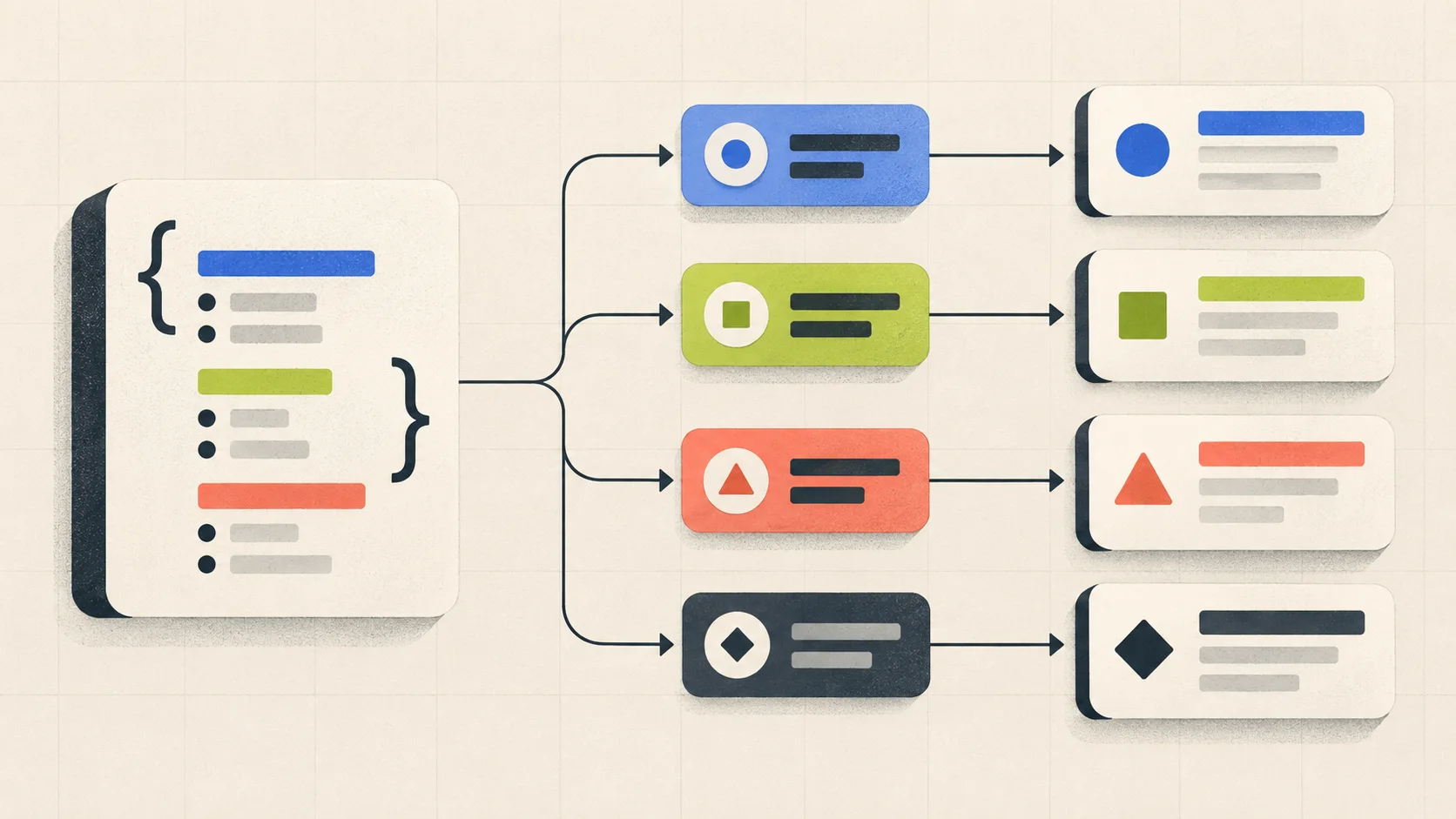
The important boundary is that the model supplies a judgment and your application owns the action. A result such as billing can suggest a queue; it does not grant permission to issue a refund. A high noul value can indicate that a statement appears true; it does not replace a database check, an authorization rule, or a human review process.
The five-step quickstart
The fastest way to learn the product is to start with one real, low-risk decision:
- Open the Playground and select an available model.
- Enter the smallest state that contains the evidence for your question.
- Add a Choice, Score, or Noul question with clear criteria.
- Generate the decision and inspect the typed answer and probability signals.
- Create an API key and send the same request from a server-side integration.
The Decisions API documentation is the source of truth for the current model list, supported question types, request fields, response fields, and error codes. The available models and pricing can change, so treat model availability as something to inspect rather than a value to hard-code into a long-lived article or application.
Step 1: Prepare the state
State is the context every question in the request reads. Use a string for a simple message, an object when the decision needs several named fields, or an array of text when the evidence naturally consists of multiple passages.
For a support workflow, an object might look like this:
{
  "ticket_text": "My payouts have failed for three days and two customers are waiting.",
  "account_tier": "business",
  "recent_events": ["payout_failed", "payout_failed", "customer_waiting"]
}
The goal is not to send the largest possible context. Send what a careful reviewer would need to answer this particular question. Extra history can increase noise, cost, latency, and privacy exposure. Remove secrets, access tokens, unrelated personal data, and internal notes that should not be evaluated.
Good state design usually has three properties:
It is decision-specific
If the question is “Which queue should own this ticket?”, include the ticket facts that distinguish queues. Do not include an entire account export unless account history is genuinely part of the routing policy.
It is inspectable
Named object fields make it easier to reproduce a decision, redact sensitive values, and understand why a result changed. Keep the original source record and the normalized state versioned separately when auditability matters.
It is small enough to test
Start with a compact state and a labeled set of representative examples. Add fields only when evaluation shows that the model needs them. This prevents prompt growth from becoming an unmeasured source of regressions.
Step 2: Define a typed question
Each question should ask one specific thing. Split “classify, prioritize, and decide whether to escalate” into separate questions. The current interface supports three useful question shapes.

Choice: select one option
Use Choice for classification, routing, filtering, and an agent's next step. The criteria field maps each option to a description, which gives the model and future reviewers a shared meaning for the labels.
{
  "type": "choice",
  "instructions": "Which approved team should handle this ticket?",
  "criteria": {
    "billing": "Charges, invoices, refunds, or payment failures",
    "technical": "A product defect or integration failure",
    "account": "Access, identity, or account-security problems",
    "manual_review": "The evidence does not fit the other options"
  }
}
Always include a fallback when the real world can exceed your labels. A forced choice can look precise while quietly routing unfamiliar cases to the wrong team.
Score: rate an ordered rubric
Use Score for urgency, severity, relevance, completeness, or another ordered scale. Criteria should describe the levels from low to high in terms that someone can test. A score is not a vague “overall quality” number; it is an operational rubric.
{
  "type": "score",
  "instructions": "How urgent is this support issue?",
  "criteria": [
    "Routine: no active customer impact",
    "Elevated: a customer is blocked but a workaround exists",
    "Urgent: multiple customers or a critical workflow is blocked"
  ]
}
The response can be probability-weighted, so it may land between rubric levels. That is useful for ranking and thresholds, but your application should define what each range means before it triggers an action.
Noul: judge a focused yes-or-no statement
Use Noul when the question can be stated as a proposition: “Does this message communicate urgency?” or “Is the supplied evidence sufficient to publish this claim?” The result is a value from 0 to 1 representing the probability of yes.
{
  "type": "noul",
  "instructions": "Does this ticket require immediate human attention?",
  "criteria": {
    "true": "A critical workflow is blocked or the issue affects multiple customers",
    "false": "The issue is routine, isolated, or has a safe workaround"
  }
}
Avoid packing several conditions into one Noul question. If a result depends on urgency, customer impact, and policy approval, ask separate questions or make the policy explicit in application code.
Step 3: Run the request
Once the Playground produces a useful result, move the same state and question design to a server. The endpoint is:
POST https://decisionapi.net/v1/systemone
Send a Bearer API key and Content-Type: application/json. Keep the key in a server-side environment variable. Never put it in browser JavaScript, a public repository, a client bundle, or a prompt that may be logged.

Here is a complete curl example:
curl -X POST https://decisionapi.net/v1/systemone \
  -H "Authorization: Bearer $DECISIONS_API_KEY" \
  -H "Content-Type: application/json" \
  -d '{
    "model": "typesafe/jev-1.13",
    "state": {
      "ticket_text": "My payouts have failed for three days.",
      "account_tier": "business"
    },
    "questions": {
      "department": {
        "type": "choice",
        "instructions": "Which approved team should handle this ticket?",
        "criteria": {
          "billing": "Payments, charges, refunds, or payouts",
          "technical": "Product or integration failure",
          "account": "Access or account security",
          "manual_review": "Insufficient or conflicting evidence"
        }
      },
      "needs_attention": {
        "type": "noul",
        "instructions": "Does this require immediate human attention?"
      }
    }
  }'
The model ID in this example is illustrative of the current documentation. Use an ID from the currently available model list and confirm that the selected model supports the question types you send. Multiple questions share the same state and are evaluated as part of one request, which is useful when routing and urgency belong to the same workflow.
A JavaScript adapter should treat the parsed body as untrusted data and validate the answer before using it:
const response = await fetch('https://decisionapi.net/v1/systemone', {
  method: 'POST',
  headers: {
    Authorization: `Bearer ${process.env.DECISIONS_API_KEY}`,
    'Content-Type': 'application/json',
  },
  body: JSON.stringify(request),
});

if (!response.ok) {
  throw new Error(`Decision request failed: ${response.status}`);
}

const result: unknown = await response.json();
// Validate result before reading answers.department or taking an action.
Step 4: Read the structured response
The response includes the selected model and an answers object keyed by the question IDs you sent. It can also include usage with input and output token counts and request timing such as elapsedMs.
An abbreviated response may look like this:
{
  "model": "typesafe/jev-1.13",
  "answers": {
    "department": {
      "type": "choice",
      "choice": "billing",
      "probabilities": {
        "billing": 0.88,
        "technical": 0.08,
        "account": 0.02,
        "manual_review": 0.02
      },
      "confidence": 0.81
    },
    "needs_attention": {
      "type": "noul",
      "noul": 0.76
    }
  },
  "usage": {
    "input_tokens": 296,
    "output_tokens": 38
  }
}
Choice returns the highest-probability option, probabilities for the options, and a confidence signal. Score returns a probability-weighted score, a legend, per-level probabilities, and confidence. Noul returns the yes probability. These signals are useful for thresholds and review queues, but they are not a guarantee of business accuracy.
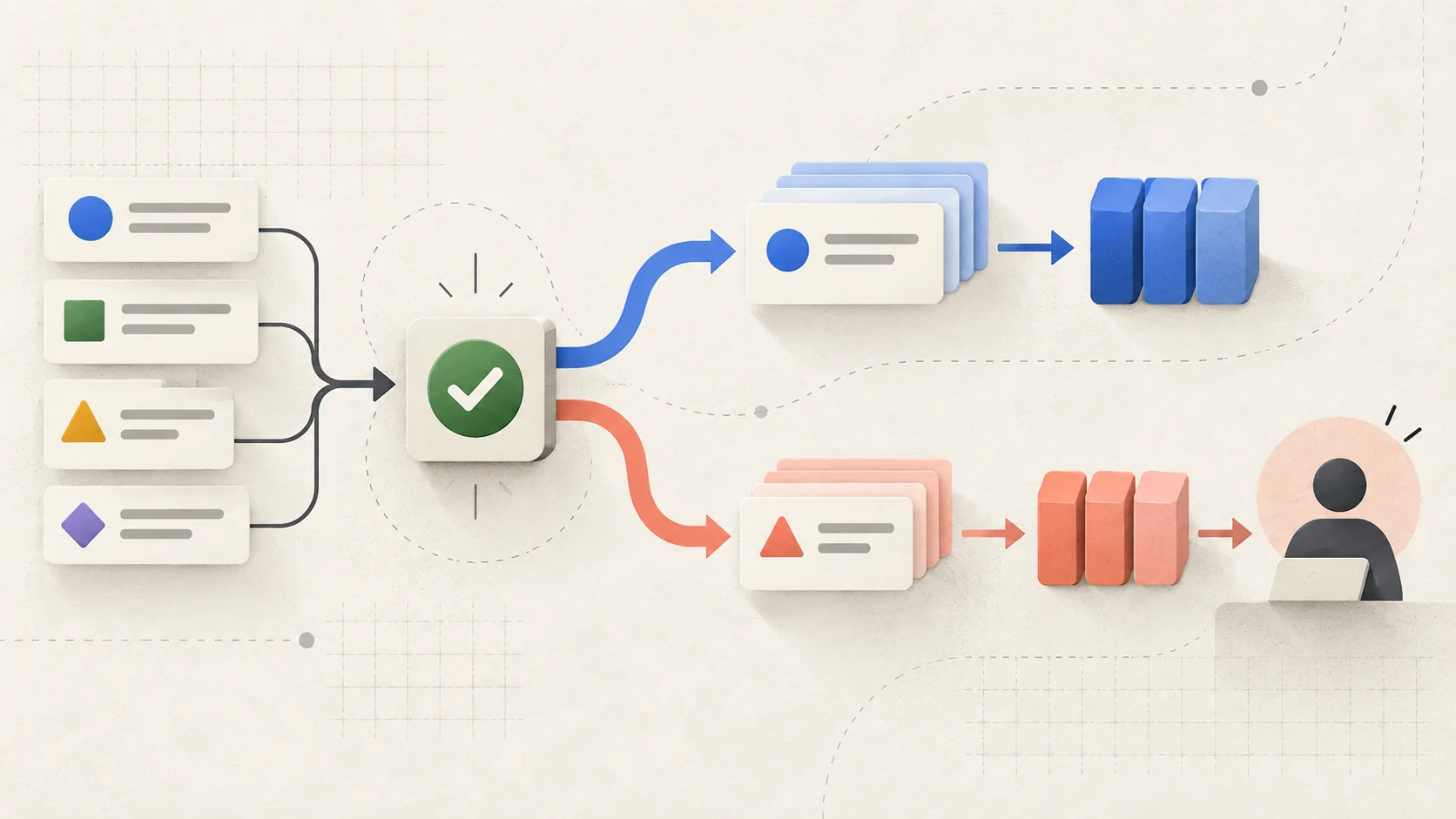
Use thresholds that match the risk of the action. A low-risk tag might be automated at a lower threshold and sampled for review. A refund, account lock, deletion, or permission change should usually require stronger evidence, deterministic checks, or a human approval path.
Step 5: Connect the answer to application policy
The safest integration has two layers:
model judgment → validation → deterministic policy → action or human review
For example, a support router can implement rules like these:
const department = result.answers.department;
const needsAttention = result.answers.needs_attention;

if (!allowedDepartments.has(department.choice)) {
  return sendToManualReview('Unknown department');
}

if (needsAttention.noul >= 0.8 && ticket.accountTier === 'business') {
  return escalateToOnCall(department.choice);
}

return routeToQueue(department.choice);
The model does not execute a tool, bypass a permission check, or make an irreversible change. It produces evidence for a function that already knows the allowed queues and actions. This separation is especially important when using a decision inside an AI agent: the agent may ask which next step is appropriate, but the host application still controls tool availability, scope, confirmation, and audit logging.
Choosing a model and evaluating quality
Decisions API exposes multiple models through one request shape so you can compare a workflow instead of rewriting your integration for every provider. The model directory and documentation show the currently available IDs and supported question types. The site currently describes Jev 1.13 as a general structured decision model, while the Span family is focused on Noul-style conversation-behavior judgments. Availability, performance, and pricing should be verified in the product before a production launch.
Use a small evaluation set before automating:
- Collect clear, ambiguous, and out-of-distribution examples.
- Write the expected answer and the reason a reviewer would choose it.
- Run the same questions against candidate models.
- Measure answer quality, uncertainty, latency, and cost together.
- Inspect false positives and false negatives by business impact.
- Start in shadow mode before allowing the result to change production state.
Do not select a model only because it has the highest average confidence. A model that is confidently wrong on a high-cost case is worse than one that sends uncertain cases to review. The useful metric is the quality of the complete workflow, including review volume and the cost of incorrect actions.
If your application uses several questions, keep their meanings stable. Version the question IDs, instructions, criteria, model ID, threshold, and policy. When a rubric changes, treat it as a new decision contract rather than silently comparing results from incompatible definitions.
Production checklist

Before shipping a Decisions API integration, check the following:
- Secret handling: keep the API key in a server-side secret and rotate it when needed.
- Input minimization: remove credentials, unnecessary personal data, and unrelated context.
- Schema validation: validate the response as
unknown; reject missing, malformed, or unknown answer values. - Policy ownership: keep permissions, allowlists, side-effect controls, and final actions in deterministic application code.
- Fallback behavior: route timeouts, invalid results, low confidence, and unsupported cases to a safe review path.
- Retry discipline: the API documents 401 for missing or invalid authentication, 422 for validation errors, 429 for rate limits, and 529 for temporary overload. Fix 401 and 422 instead of blindly retrying. For 429 and 529, use exponential backoff with a cap and an idempotent workflow.
- Observability: record a request ID if returned, model ID, question version, policy version, latency, usage, final action, and later human outcome.
- Evaluation: keep a held-out test set and monitor quality after changes to state construction, questions, models, or thresholds.
- Human review: use review for high-impact, ambiguous, or novel cases rather than forcing a confident-looking answer.
For credits, concurrency, and plan details, check the current pricing page. A shared credit balance and request history can help connect Playground experiments with API usage, but your own logs should remain the authoritative record for business outcomes.
Common questions
Is Decisions API a chat assistant?
No. It is a decision interface for turning text or structured state into typed answers. Use a general language model when the product needs open-ended writing, explanation, or planning. Use Decisions API when the application can define the question and acceptable answer shape before the call.
What can I put in state?
The current documentation describes text, JSON objects, and arrays of text. Choose the shape that makes the evidence clear, and send only what the question needs. Image, audio, and video inputs are not part of the current documented input boundary.
Should I ask several questions in one request?
Yes, when the questions share the same state and belong to one decision workflow. Parallel questions can return routing, urgency, or evidence signals together. Keep each question narrow and let application code combine the results under an explicit policy.
Is confidence the same as accuracy?
No. Confidence and probability are model signals derived from the response distribution. Measure calibration and business accuracy on labeled examples, then choose thresholds based on the cost of mistakes and the volume your review team can handle.
Does the API execute my next action?
No. Your service remains responsible for routing, sending, changing data, calling tools, requesting confirmation, and recording the audit trail. Treat the API response as an input to those controls.
How should I start?
Pick one reversible, low-risk decision and test it in the Playground. Then reproduce the request in a server-side integration, evaluate it on real examples, and add a review path before automating a consequential action. If you need a broader workflow rather than one API call, explore the product's workflow guidance.
Final takeaway
The practical answer to “how to use Decisions API” is: define a small decision contract, provide focused state, choose the question type that matches the job, inspect the structured result, and keep authority in your application.
Start with one question that already exists in your product. When the answer space is explicit and the next action is well-defined, a typed decision can be easier to validate, evaluate, route, and monitor than free-form text. That is the point of the interface: the model supplies a useful signal, while your software remains responsible for what happens next.